오늘은 자료구조 + 람다 + 스트림에 대해 학습했다.
익숙치않아 헷갈리는 개념이 좀 많았는데,
오늘 배운 개념을 나중에 다시 빠르게 복기하기 위해 정리해본다...
1. Set - “중복을 허용하지 않는 컬렉션”
Set의 핵심
- 중복 불가
- 인덱스 없음
- 값의 존재 여부가 중요할 때 사용
HashSet / LinkedHashSet / TreeSet 차이
| 구현체 | 특징 |
|---|---|
| HashSet | 가장 빠름, 순서 보장 ❌ |
| LinkedHashSet | 삽입 순서 유지 |
| TreeSet | 자동 정렬 (오름차순) |
짧은 예제
Set<String> set = new HashSet<>();
set.add("Java");
set.add("Java");

System.out.println(set); // [Java]
Set<Integer> treeSet = new TreeSet<>();
treeSet.add(3);
treeSet.add(1);
treeSet.add(2);
System.out.println(treeSet); // [1, 2, 3]👉 중복 제거 목적이면 HashSet,
👉 순서가 필요하면 LinkedHashSet,
👉 정렬이 필요하면 TreeSet
2. Map - “Key로 Value를 찾는다”
Map의 핵심
- Key는 중복 불가
- Value는 중복 가능
- 빠른 조회가 목적
HashMap / LinkedHashMap / TreeMap
| 구현체 | 특징 |
|---|---|
| HashMap | 기본 선택, 순서 없음 |
| LinkedHashMap | 순서 유지 |
| TreeMap | Key 기준 자동 정렬 |
중첩 Map 예제
Map<String, Integer> hm1 = new HashMap<>();
hm1.put("a", 1);
hm1.put("b", 2);

Map<String, Integer> hm2 = new HashMap<>();
hm2.put("c", 3);

Map<String, Map<String, Integer>> hm3 = new HashMap<>();
hm3.put("first", hm1);
hm3.put("second", hm2);

System.out.println(hm3); // {first={a=1, b=2}, second={c=3}}
TreeMap 예제 (Key 정렬)
Map<String, String> tm = new TreeMap<>();
tm.put("제주", "064");
tm.put("서울", "02");
tm.put("세종", "044");

System.out.println(tm); // {서울=02, 세종=044, 제주=064}
3. Properties - 설정값 전용 Map
Properties props = new Properties();
props.setProperty("url", "localhost");
props.setProperty("port", "8080");

System.out.println(props.getProperty("url")); // localhost- Key / Value가 항상 String
- 설정 파일(.properties) 다룰 때 사용
4. LinkedHashMap - “Map + 순서”가 필요할 때 ⭐
한 줄 정의
LinkedHashMap은 HashMap에 ‘순서’를 추가한 Map이다.
- 조회 성능은 HashMap과 거의 동일
- 대신 전체 순서를 기억
내부 구조 개념
- HashMap: 빠른 조회
- LinkedList: 순서 관리
👉 두 구조가 서로 독립적으로 동작
LinkedHashMap이 보장하는 순서 2가지
1) 삽입 순서 (기본값)
- get() 해도 순서 유지
LinkedHashMap<String, Integer> map = new LinkedHashMap<>();

map.put("A", 1);
map.put("B", 2);
map.get("A");

System.out.println(map); // 순서: A → B
2) 접근 순서 (accessOrder = true)
LinkedHashMap<String, Integer> map =
    new LinkedHashMap<>(16, 0.75f, true);

map.put("A", 1);
map.put("B", 2);
map.put("C", 3);

map.get("A");

System.out.println(map); // 순서: B → C → A- 최근 접근한 항목이 뒤로 이동
- 캐시(LRU)의 핵심 개념
LinkedHashMap 생성자
new LinkedHashMap<>(initialCapacity, loadFactor, accessOrder);- initialCapacity: 초기 버킷 크기 (기본 16)
- 너무 작으면 resize 자주 발생
- 너무 크면 메모리 낭비
- loadFactor: 리사이즈 기준 (기본 0.75)
- 언제 resize 할지 결정하는 비율
- accessOrder:
- false → 삽입 순서
- true → 접근 순서 (캐시용)
LinkedHashMap<String, Integer> map =
    new LinkedHashMap<>(16, 0.75f, true);

map.put("A", 1);
map.put("B", 2);
map.put("C", 3);

map.get("A");
map.get("B");

// 초기: A → B → C
// get(A): B → C → A
// get(B): C → A → B
👉 accessOrder = true
→ 최근에 접근한 데이터가 뒤로 이동
→ 캐시 정책(LRU)에 적합
LinkedHashMap으로 캐시를 만드는 이유
캐시의 핵심 조건
- 빠른 조회 (O(1))
- 오래된 데이터 제거 정책 필요
- 순서 관리 필요
➡️ LinkedHashMap은 이걸 다 만족
removeEldestEntry - 오래된 데이터 제거 정책
LinkedHashMap에는 이런 메서드가 있음
protected boolean removeEldestEntry(Map.Entry<K,V> eldest)- 가장 오래된 엔트리를 자동 제거할지 결정
- put() 이후에 호출됨
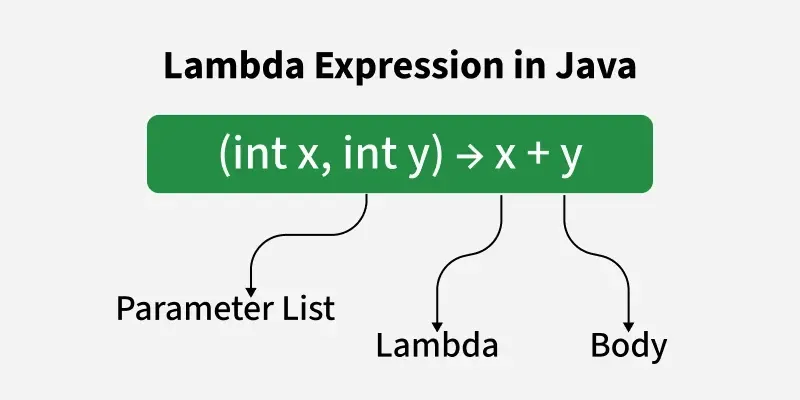
5. 람다 - “행동을 값처럼 전달”
왜 필요할까?
- 메서드를 직접 넘길 수 없던 Java의 한계를 보완
- 동작 자체를 파라미터로 전달
람다는
함수형 인터페이스의 구현을 한 줄로 쓰는 문법
직접 만들어 보는 함수형 인터페이스
@FunctionalInterface
interface Calculate {
    int operate(int a, int b);
}
Calculate plus = (a, b) -> a + b;
Calculate minus = (a, b) -> a - b;static int operateNumber(int a, int b, Calculate cal) {
return cal.operate(a, b);
}
System.out.println(operateNumber(7, 3, plus)); // 10
System.out.println(operateNumber(7, 3, minus)); // 4👉 로직을 파라미터로 넘긴다
자주 쓰는 표준 함수형 인터페이스
Runnable task = () -> System.out.println("작업 수행");
new Thread(task).start();
Consumer<String> consumer = v -> System.out.println(v);
consumer.accept("hello");Function<String, Integer> toInt = s -> Integer.parseInt(s);
System.out.println(toInt.apply("123")); // 123Predicate<Integer> over80 = n -> n >= 80;
System.out.println(over80.test(100)); // true
6. 메서드 레퍼런스
람다에서 불필요한 매개변수 제거
list.forEach(System.out::println);- 클래스명::메서드명
- 가독성 개선 목적
7. 스트림 - “데이터를 흘려보내며 처리”
스트림이 해결하는 문제
- 반복문 + 조건문 중첩
- 가독성 저하
👉 선언형 데이터 처리
스트림 3단계
생성 → 중간 연산 → 최종 연산생성
list.stream();
Arrays.stream(arr);
IntStream.range(1, 4);
중간 연산
list.stream()
    .filter(n -> n % 2 == 0)
    .map(n -> n * 2)
    .distinct();
flatMap — 중첩 구조 평탄화
List<List<String>> list = List.of(
    List.of("apple", "banana"),
    List.of("cherry")
);

List<String> result =
    list.stream()
        .flatMap(l -> l.stream())
        .collect(Collectors.toList());

// [apple, banana, cherry]
정렬
list.stream()
    .sorted()
    .forEach(System.out::println);
list.stream()
.sorted(Comparator.reverseOrder())
.forEach(System.out::println);최종 연산
Arrays.stream(arr).sum();
Arrays.stream(arr).count();
Arrays.stream(arr).max().getAsInt();
collect — 가장 많이 쓰임
List<String> l =
    lectureList.stream()
        .collect(Collectors.toList());
Set<String> s =
lectureList.stream()
.collect(Collectors.toSet());Map<String, Integer> m =
lectureList.stream()
.distinct()
.collect(Collectors.toMap(k -> k, String::length));groupingBy / partitioningBy
Map<String, List<Integer>> grouped =
    numbers.stream()
        .collect(Collectors.groupingBy(
            n -> n % 2 == 0 ? "Even" : "Odd"
        ));
Map<Boolean, List<Integer>> partitioned =
numbers.stream()
.collect(Collectors.partitioningBy(n -> n % 2 == 0));8. Collections 유틸 클래스
Collections.sort(list);
Collections.reverse(list);
Collections.max(list);
Collections.frequency(list, "B");- 컬렉션 자체를 조작할 때 사용
- 스트림과 용도 구분해서 사용
'Learning Log' 카테고리의 다른 글
| [멋사 클라우드 5기] Day 8 - 입출력, 직렬화, 스레드, Enum (0) | 2026.02.02 |
|---|---|
| [멋사 클라우드 5기] Day 7 - Lambda · Stream 심화 + Optional (0) | 2026.01.30 |
| [멋사 클라우드 5기] Day 5 - Java 기본 라이브러리 & 컬렉션 정리 (0) | 2026.01.28 |
| equals가 있는데 hashCode는 왜 필요할까? (0) | 2026.01.27 |
| abstract vs interface: 비슷한데 왜 굳이 둘 다 있을까? (0) | 2026.01.27 |